
WinUndelete - How to Recover Deleted Files - Step 1
New Scan
Click [New Scan] from the toolbar of WinUndelete. The Scan Wizard will be displayed. It allows you define the drive letter to scan, the file type to find and the destination folder.
Click [New Scan] from the toolbar of WinUndelete. The Scan Wizard will be displayed. It allows you define the drive letter to scan, the file type to find and the destination folder.
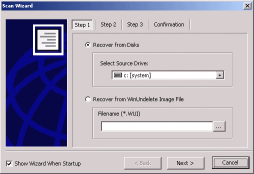
Scan Wizard - Step 1
1. If you need to recover files from a drive/disk on your computer,
select the one that containing the lost file or files and click the
"Next" button
2. If you have previously saved a WinUnelete Image File, you may
select "Recover from WinUndelete Image File", then specify
the filename you need to load.
Support: http://www.winundelete.com/support/
Website: http://www.winundelete.com
(C)Copyrights - WinRecovery Software. All rights are reserved.